


I usually judge a restaurant-ordering app by what happens after the first download: does it make a normal meal easier, does it explain what I am agreeing to, and can I still make sensible choices when I am in a hurry? Casey's is built around a very clear routine—ordering pizza and collecting points—but my experience is that its value depends heavily on whether Casey's is already a practical food option where you live. It is free, aimed at Everyone, and comes from Casey's General Store, so it feels more like a focused companion for an existing customer than a broad restaurant-discovery service.
The app sits in the Food & Drink category and has grown well beyond a niche audience, with over 5 million installs. Its average rating is 3.9 from around 39 thousand ratings, alongside roughly 13 thousand written reviews. Those numbers suggest a useful but not flawless experience: plenty of people rely on it, while enough users encounter friction that I would not call it universally smooth. I think that is the right starting point. This is not an app I would install simply to browse every restaurant nearby; it makes sense when Casey's pizza, convenience-store food, or rewards are already part of your routine.
What the app is really for in everyday use
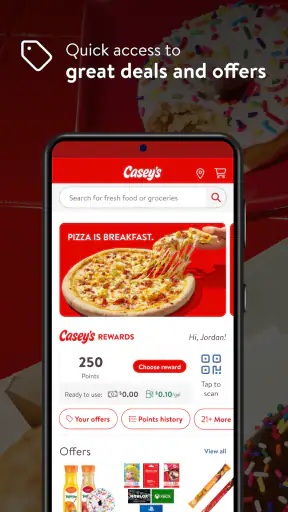
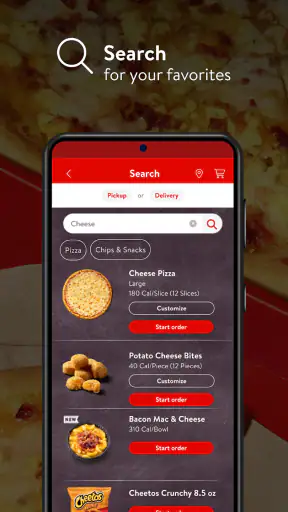
The strongest use case is a planned pickup or delivery order when you already know what you want. Instead of calling, repeating an address, and trying to remember which reward details apply, I can use the app as a single place to build the order and keep the loyalty side connected to it. That basic flow sounds ordinary, but it matters on busy evenings when several people are deciding toppings while one person is trying to place the order.
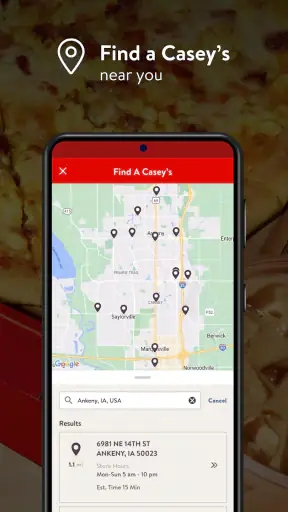
A realistic example is a family leaving work or school at different times. I can open the app, choose the Casey's location that fits the route home, review the pizza order, and use the rewards account during checkout rather than dealing with a separate paper-card habit. The useful detail is not merely speed. It is reducing the number of small decisions that tend to cause mistakes: the location, the order contents, the collection of points, and the final review all happen in one restaurant-specific workflow.
That focus is also the main limitation. A general delivery marketplace is better if I want to compare several restaurants, inspect independent customer feedback across many businesses, or combine items from different places. Casey's is not designed for that kind of browsing. It is best understood as a direct channel to one chain, not as a universal food-ordering directory.
The app was released on December 14, 2015, and the current version is 27.7. It supports Android 7.0 and later, which keeps it available to people using older compatible phones. That broad compatibility is helpful, although an older device can still make any ordering process feel less comfortable if screens load slowly or the keyboard is awkward. I would check the phone requirement before planning to use an older handset as the only way to place an urgent order.
Trust starts with a narrow purpose
From a trust perspective, I prefer that the app has a recognizable, limited job. It is connected to Casey's General Store rather than presenting itself as an anonymous middleman. That does not automatically make every interaction risk-free, but it gives me a clearer reason for opening the app and a clearer expectation about the account and order information involved.
The store-facing identity is also easy to understand: Casey's is free, belongs to Food & Drink, and is suitable for Everyone. I would still read each permission or consent screen when installing it, because the age label describes the intended audience rather than telling me every detail about data handling. The practical trust test is whether the app explains why a requested access is needed and lets me continue when that access is not essential to ordering.
I do not treat the number of installs or the rating as proof of privacy or reliability. They tell me that the app has a substantial user base and a mixed overall reception, but they cannot answer questions about my account controls or the exact information shared during checkout. For those questions, the visible choices inside the app matter more than popularity.
Account controls deserve attention before the first order
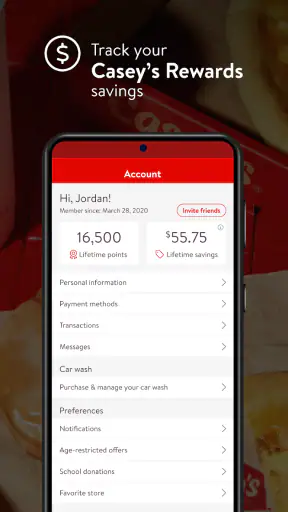
The most useful habit is to pause at account creation and checkout instead of tapping through every screen automatically. I would check whether the app allows me to review the account details attached to the order, whether the selected location is correct, and whether any optional communication choices are clearly separated from the purchase itself. This is especially important when ordering for someone else, because a saved address or phone number can easily become the wrong default.
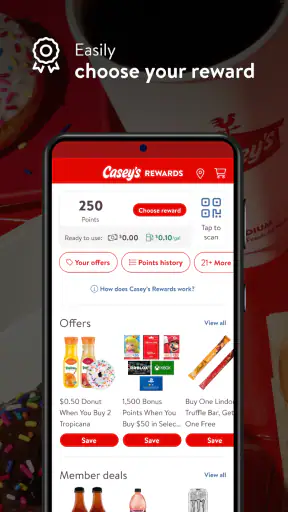
Rewards add another layer to that review. Points are a reason to use the app, but they can also make people rush through the final screen because they do not want to miss a benefit. I recommend checking the points balance or reward application before submitting the order, then confirming that the reward has actually been reflected in the summary. That small pause is more valuable than assuming the app will always choose the best redemption automatically.
I also prefer using the app with notifications treated as a choice rather than a requirement. Order-status messages can be useful when I am waiting for food, but promotional alerts can become noise. If the settings provide separate controls, I would keep the updates that support an active order and disable anything I do not need. If a choice is not obvious, I would avoid granting more access than the ordering task requires and revisit the settings later.
Where personal data becomes most sensitive
The most sensitive moments are not when I am looking at a pizza menu. They are when I enter delivery details, sign in, save payment information, or connect a purchase to a loyalty account. Those steps combine identity, location, and transaction context. I take extra care there because a convenient saved profile can also make an accidental order harder to notice before it is sent.
For delivery, I would verify the address every time I order from a different place or use a different phone. A location remembered from a previous order may be convenient at home but wrong at work, a hotel, or a friend’s house. Pickup deserves the same attention: selecting a familiar store from a list is not enough if I am traveling or if two locations are close together. The final location check is one of the simplest ways to prevent a privacy-sensitive mistake, since the wrong store can reveal where I intended to be or send the order somewhere inconvenient.
Payment is another point where I favor control over speed. If the app offers a choice between saving payment details and entering them when needed, I would decide based on how often I order and how comfortable I am with the phone’s security. A saved method is convenient for repeat orders, but a person who orders only occasionally may prefer not to keep another payment profile active. I would also avoid placing an order over an unsecured public connection when a private mobile connection is available.
Rewards can make purchasing history feel less visible because the points balance is presented as a benefit. In practice, linking orders to an account creates a record of activity associated with that profile. I am not saying that is unusual or automatically bad; it is the trade-off for earning points conveniently. The important question for me is whether I understand that trade-off and can choose how much profile information to maintain.
Small workflows that make the experience safer and easier
My first practical tip is to build the order before deciding whether to sign in or use rewards. That lets me separate the food decision from the account decision. I can confirm the correct Casey's location, inspect the order total, and then decide whether collecting points is worth using the account at that moment. It is a better workflow than logging in reflexively and only later noticing that an old address or payment method is attached.
Second, I would take a screenshot or note of the final order summary when the purchase is important, such as a group meal or a time-sensitive pickup. I am not relying on that as a substitute for the app’s order history; it is simply a personal reference showing the selected location, items, and expected arrangement. If something looks wrong later, having that context makes it easier to explain the issue without reconstructing the whole order from memory.
Third, I would treat reward redemption as a separate decision from earning points. A discount or reward can be tempting, but it may not suit a larger order, a shared meal, or a future visit. Before applying it, I would check whether the resulting order still matches what everyone needs. The app’s loyalty feature is most useful when it supports a purchase I already wanted, not when it persuades me to order extra food simply to avoid wasting points.
Fourth, I would keep the app updated when the phone supports the current release, but I would not interpret a newer version as a guarantee that every problem is solved. Updates can improve compatibility and fix defects, yet they can also change screen layouts or settings locations. After an update, I would quickly review notification and account preferences before placing a large order. That is a simple way to preserve user control when the interface changes.
How it compares with calling, browser ordering, and delivery marketplaces
Compared with calling Casey's, the app gives me more time to inspect the order before committing. That is useful for complicated topping choices or when I am ordering for several people and do not want to repeat details aloud. Calling may still be better for a special request that is difficult to express through standard menu options, or when a person needs direct clarification from the store.
Compared with using a mobile browser, a dedicated app can feel more convenient for repeat orders because the restaurant-specific experience is already organized around Casey's locations, ordering, and rewards. A browser may be preferable for a one-time order, especially for someone who does not want another app or account on the phone. The decision comes down to frequency: regular Casey's customers gain more from the loyalty workflow, while occasional customers may find a browser sufficient.
Compared with a broad delivery marketplace, Casey's has a narrower selection but a more direct relationship with the chain. That can reduce the confusion of comparing multiple intermediaries, yet it also means I lose the marketplace’s wider restaurant choice and cross-restaurant ordering tools. I would choose Casey's when the destination is already decided. I would choose a marketplace when the main question is which restaurant offers the best option nearby.
Who should use it, and who should skip it
I would recommend the app to a Casey's customer who orders pizza more than occasionally, wants to collect points, and appreciates checking the order details personally before submitting. It is also a sensible choice for households where one person repeatedly handles food orders and wants a consistent place to manage them. The free price removes the biggest barrier to trying it, although the real benefit still depends on having convenient Casey's locations and finding the rewards useful.
I would be more cautious about recommending it to someone who rarely visits Casey's, avoids loyalty accounts, or wants to compare many restaurants in one screen. That person may gain little from installing a chain-specific app. I would also suggest a different option to anyone who needs highly specialized dietary communication or unusual order modifications and prefers speaking directly with staff before payment. A structured menu is efficient, but it cannot replace a conversation in every situation.
People sharing a phone should pay particular attention to account separation. A saved address, reward balance, or payment method can be used unintentionally if profiles are not clearly separated. I would avoid leaving an account signed in on a public or shared device, and I would review the order summary before payment even when the meal seems routine. Convenience is valuable, but it should not remove the final opportunity to catch a mistake.
My cautious verdict after looking at control as well as convenience
The best reason to choose Casey's is the combination of direct ordering and rewards, not the promise of a universal food app. In my experience, that focused design can make a repeat pizza order less stressful, especially when I verify the store, delivery or pickup details, account information, and reward choice before submitting. The app’s scale and long availability make it a credible option for Casey's customers, while the 3.9 average also reminds me to keep expectations realistic rather than assuming every device and order flow will feel perfect.
I would install it if Casey's is already part of my eating routine and I want a more organized way to order. I would skip it if I only need a one-off purchase, dislike maintaining restaurant accounts, or mainly want to compare different food providers. Either way, I would make the decision based on control: use only the account details and permissions that serve the order, check sensitive information at checkout, and adjust notifications afterward. With that approach, Casey's is a practical, free Food & Drink app for the right customer, but its narrow purpose is exactly why it should not be mistaken for a complete alternative to every other way of ordering food.


